
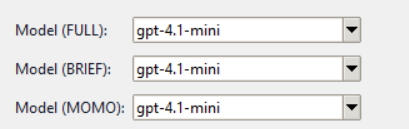
TradeTalkerAI allows you to select which ChatGPT model is used for each analysis mode:
- FULL
- BRIEF
- MOMO
These controls are optional and intended for advanced users.
The default model selections are intentionally chosen for accuracy, speed, and cost efficiency.
If you are unsure what to change — don’t change anything.
TradeTalkerAI is already optimized out of the box.
✅ Default Model Configuration
By default, all modes use:
- gpt-4.1-mini
| Mode | Default Model |
|---|---|
| FULL | gpt-4.1-mini |
| BRIEF | gpt-4.1-mini |
| MOMO | gpt-4.1-mini |
This model provides the best balance of:
- Chart reasoning
- Speed
- Cost control
- Consistency across modes
🔍 Where These Models Come From
The model list is populated from OpenAI’s currently available ChatGPT models associated with your API key.
- Models shown may vary over time
- Newer models may appear automatically
- Deprecated models may disappear
TradeTalkerAI does not hardcode the list — it reflects what OpenAI makes available.
🧠 How the Models Are Used
Each analysis mode sends:
- A screenshot of your chart
- A mode-specific prompt (FULL / BRIEF / MOMO)
- Context about structure, volume, and confirmation logic
The model selection does NOT change the trading logic.
It only affects how the AI reasons and responds.
What stays the same:
- Bias detection
- Quality grading
- Entry / stop / target logic
- Confirmation rules
What can change:
- Speed
- Depth of explanation
- Wording style
- Cost per analysis
Your chart controls the outcome, not the model.
⚙️ Why You Might Change a Model
Advanced users may experiment if they want:
🔹 Faster Responses
- Try lighter or “mini” models for rapid BRIEF or MOMO reads
🔹 More Verbose Reasoning
- Some larger models may explain structure more thoroughly in FULL mode
🔹 Cost Control
- Different models have different token costs
- Running FULL analysis repeatedly can add up
🔹 Testing / Comparison
- Power users may compare outputs between models for research
Reasons NOT to Change Models
You’re new to TradeTalkerAI
You want consistent results
You assume “bigger model = better trades”
Inconsistent model choices can lead to:
- Different wording
- Different confidence phrasing
- Perceived (but not real) logic changes
🧩 Recommended Usage Pattern
- Leave all modes on gpt-4.1-mini
- Use Hotkeys to control detail
- Treat model selection as an advanced tuning knob, not a requirement
Model selection controls how the AI speaks and reasons,
not what it sees.